The rise of the ai native organisation: context as the new competitive advantage
Last week's Atlassian Team '26 event laid out a clear vision for the future of work, moving beyond simple chatbots to a fundamental re-architecture of how organisations operate. The core message is a shift towards the "AI native organisation", where human ingenuity is amplified by autonomous agents operating on a rich bed of company data.
Defining the AI native organisation
An AI native organisation is not a traditional business with a few floating chatbots. Instead, it represents a fundamental re-architecture of value where humans move to the critical frontiers – defining intent, navigating trade-offs, and resolving ambiguities – while execution is increasingly handled by autonomous agents at scale.
The coming years will have growing pains. While model performance improves exponentially, many businesses remain stuck in a linear gear, piloting or waiting to see. This is not caution; it is surrender in slow motion. You cannot wait and see your way through an existential shift in technology. The future will belong to the AI native organisations.
Context is the new fuel
By 2026, raw intelligence will be a commodity you can buy by the token. Therefore, models cannot be your differentiator. The true differentiator is your context – the institutional memory of every project, goal, and workflow that only your team understands.
Think of it as a simple formula: business acceleration equals context multiplied by intelligence. Intelligence is the engine, but context is the fuel. If your AI doesn't know what choice you made in 2024, it can't help you win in 2026.
For Atlassian customers, this context already exists in what is called the teamwork graph. It is not a database or a set of files; it is the connective tissue between your work, your people, and your tools. Every action you take – defining goals in Jira, designing in Figma, collaborating in Confluence – is the continuous creation of your company's collective context.
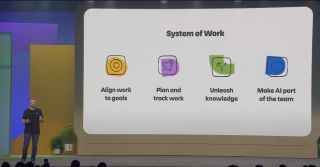
The Atlassian system of work
The company has operationalised these variables through the Atlassian system of work, a connective foundation for how teams align to goals, plan their work, and unleash their knowledge. The teamwork graph is the data fabric for the entire system, providing the context.
This context is multiplied through the Atlassian AI gateway, a secure portal to leading edge AI models that acts as a bridge between your private organisational context and collective intelligence, without compromising data security. The final piece is Rovo, the interface that turns context and intelligence into actual momentum for your business.
Growing your context graph
The first major focus is on how to grow, build, and deepen your context graph. Live demos showed how Rovo memory has been massively improved, featuring two different types of memory. Implicit memory uses the teamwork graph continuously to learn about you and your job, while explicit memory allows you to add specific instructions, such as anonymising customer data or replacing real names with cartoon characters for a live presentation.
Enhancements to connectors mean data is now synced in near real-time. Google Drive can index images and text within images, Microsoft Teams indexes meeting transcripts, and Salesforce indexes campaigns and cases with field level controls. The goal is any change inside the teamwork graph in under 10 minutes.
A powerful example involved a long-term customer relationship of over 20 years. Rovo pulled from 61 different sources across the graph in about three minutes to generate a real-time business intelligence dashboard, complete with charts and stakeholder maps, turning a 20-year history into a single query.
The graph also expands to include physical assets. The Atlassian Williams Formula 1 team have modelled all the components of their car as first class objects in assets, connecting them to work, people, code, and their 48-year history. An engineer can now ask Rovo if an upgrade is worth it and if it can be done in time for the next race, with the AI pulling from service requests, projects, and knowledge bases to make recommendations.
Furthermore, the graph now infers skills based on what people actually do – code commits, Confluence contributions, and Jira assignments – allowing you to find the right person to unblock a project based on real work, not just a static HR record.
Harnessing context across applications
The second conversation focused on how to harness all that context across all Atlassian apps. A major advancement is semantic code intelligence, which allows you to ask questions across thousands of repositories and get answers instantly. It understands every line of source code and the intent of every file.
In a live demo, a user asked which buttons in the Confluence codebase did not use the latest style, who was working on them, and what the style guides were. In minutes, the AI searched across 11 million code files and 1.5 billion lines of code to produce an audit of button styles, a percentage breakdown of adoption, and even the specific teams and Slack channels to contact.
This capability is not just for finding old code. For a financial services company adding a new personal investment dashboard, Rovo used the teamwork graph to analyse the business context, invoke the code intelligence skill, and identify that the change would affect six repositories. When the AI reached a 50/50 decision on how to store data, it asked the user for guidance rather than going down the wrong path. It then proposed a technical architecture plan, even finding an old Confluence whiteboard and proposing a new architecture based on it.
Agents and workflows for all teams
Beyond software teams, this power extends to knowledge workers. A sales enablement team used Rovo to summarise a Q3 planning offsite, pulling from documents, meeting recordings, and spreadsheets to instantly create a Confluence whiteboard with strategic priorities, decisions, and embedded charts.
Agents are now fully integrated into workflows. You can drag and drop work items into statuses for agents like Canva (for creative assets) or Gamma (for presentations), and the agents get to work. These agent assignments create a chat session you can resume on any device, from mobile to desktop.
For IT and operations teams, a new incident command centre powered by the teamwork graph automatically investigates incidents, pulls recent code changes from GitHub, looks at log files, identifies service dependencies, and validates root causes. It can even publish status updates and create a post-incident review with follow-up tasks once resolved. Research suggests teams adopting this can save over 55 minutes per incident.
Surfacing context everywhere
The context is not locked inside the Atlassian platform. It is being surfaced everywhere work happens through two major announcements.
First, the teamwork graph is coming to the Atlassian MCP server, allowing any AI app or tool to tap into your organisational history. In a demo, a designer new to a team used Rovo within Figma to design a custom analytics dashboard, simply providing the Jira work item. The AI pulled context from multiple related work items, Confluence specifications, and Google documents to make the first version of the prototype far better.
Second, the teamwork graph CLI provides over 380 tools and commands for agent harnesses. When an architect was assigned a vague Jira issue about session management with no links or context, the CLI allowed an AI agent to research the issue. It found related Jira items, previous pull requests, GitHub branches, designs, and the relevant people and teams, then visualised it all as a clickable graph. Internal testing has shown that connecting the teamwork graph CLI to any agent results in up to a 44% improvement in answer quality and a 48% reduction in tokens used.
Introducing the Dia browser
The final piece of the puzzle is Dia, a browser built for people who work in their tabs. It features a vertical sidebar for managing many tabs, special app integrations, and the "morning brief". This feature proactively presents a personalised memo each day, pulling to-dos from your apps, tabs, and the teamwork graph, and even highlighting anything that changed overnight so you start your day calm and focused.
Dia can also generate personalised web pages on the fly. In one example, a user asked it to create an interactive itinerary that balanced conference obligations with a trip to Disneyland. The browser read the tab group, checked calendars, searched Slack, queried the teamwork graph, and even searched the web to determine that Space Mountain is better at night, then built a fully interactive web page.
For enterprises, Dia now includes SSO, SOC 2 Type 2, MDM support, and prompt injection technology, with enterprise guard integration coming soon.
Trust and governance
Trust and security run through everything. Data protection ensures that if someone is not allowed to see it, the AI will not share it. Atlassian Guard will block sensitive content before it ever reaches a model. For autonomous agents, new agent accounts provide dedicated identities with explicitly scoped permissions, ensuring every action stays within your guard rails. Finally, audit logs now exist for every AI action and skill invocation to prove return on investment.
The invisible made visible
Atlassian has launched teamworkgraph.com as the front door for all things related to the graph. You can download the CLI, plug in the MCP server, and find connectors to grow your graph. More importantly, you can sign in to experience your own organisation's graph, seeing how rich it already is with the work, apps, and relationships that power every demo shown on stage. It is an attempt to make the invisible visible, allowing you to see the very thing that will determine what kind of company you become.
Enhance your workflows with David Simpson Apps
Discover powerful apps and integrations for Confluence and Jira. Streamline processes, embed analytics, and boost collaboration.
View our apps on the Atlassian Marketplace